
The halalfree.uk website is available as a Progressive Web App. This means that you can Install or Add to Homescreen this website on your device as an app. If you already have the halalfree logo on your device then you have already done it. Chrome has recently changed the name of this to Install and create shortcut.
Step 1
If you haven’t already done so, open halalfree.uk in a browser such as Chrome or Safari. It will not work if you open it via a shared link in Facebook. Wait for the page to load so you see the homepage.
Note: Since February 2026, it has been reported that Firefox is not correctly adding to homescreen correctly on Android devices. We advise you to use Chrome.
Step 2
If your device gives a prompt “Add to Homescreen” or “Install”, click on it and OK it.
Otherwise, on Android, look for a small icon which looks like a TV with a downward arrow. It will be on the right hand side of the URL bar (where you see the website address) next to the favourites star button. Click on the icon and OK it. If the install is successful you should see a new icon on your phone with the halalfree logo.
If neither of the above work. Then do it manually following the steps below.
Android Phone or Tablet
Be sure to open halalfree.uk in a browser, not via a link in Facebook. Click on the three vertical dots usually in the top right corner. In the menu that appears click on Install and create shortcut. Add to homescreen;. Other browsers might say Install or Add app.
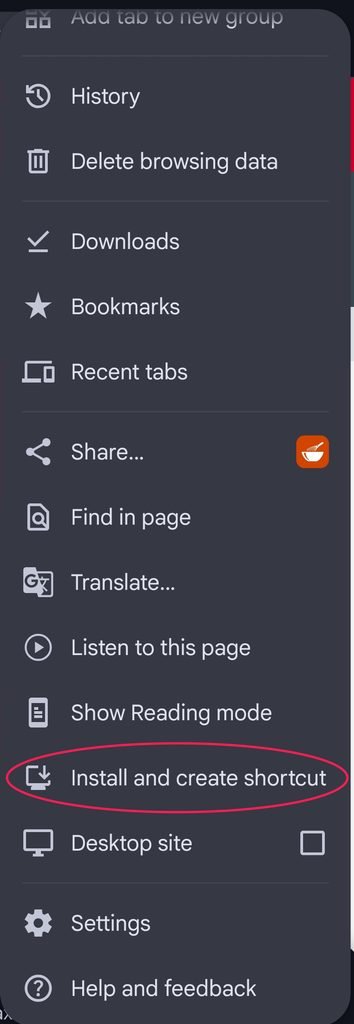
You should then click on the option to Install or Add. After the install you should see the halalfree icon on your device. Use it like an app. It will update itself when necessary.
iPhone or iPad
Be sure to open halalfree.uk in a browser, not via a link in Facebook. Click on the icon shown below at the bottom of your screen.
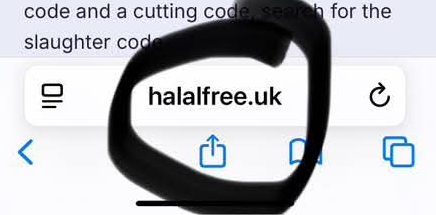
You should see the menu of options below. Click on Add to Home Screen. You might have to click OK again after that.
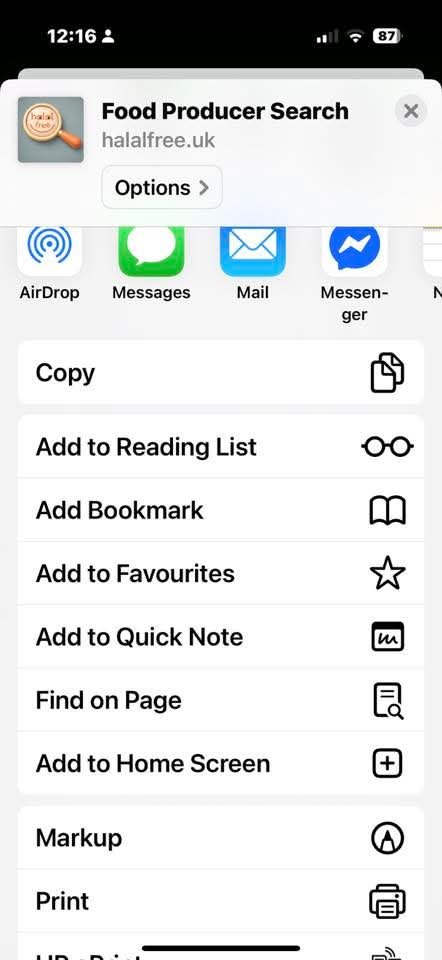
After the install you should see the halalfree icon on your device. Use it like an app. It will update itself when necessary.